
Last updated: 3 November 2026 (Asia/Karachi). Registration steps and portal paths checked against DPMIS / Social Welfare Punjab materials. Confirm the live form before you travel or pay anything.
🎧 Listen: 1-minute audio overview
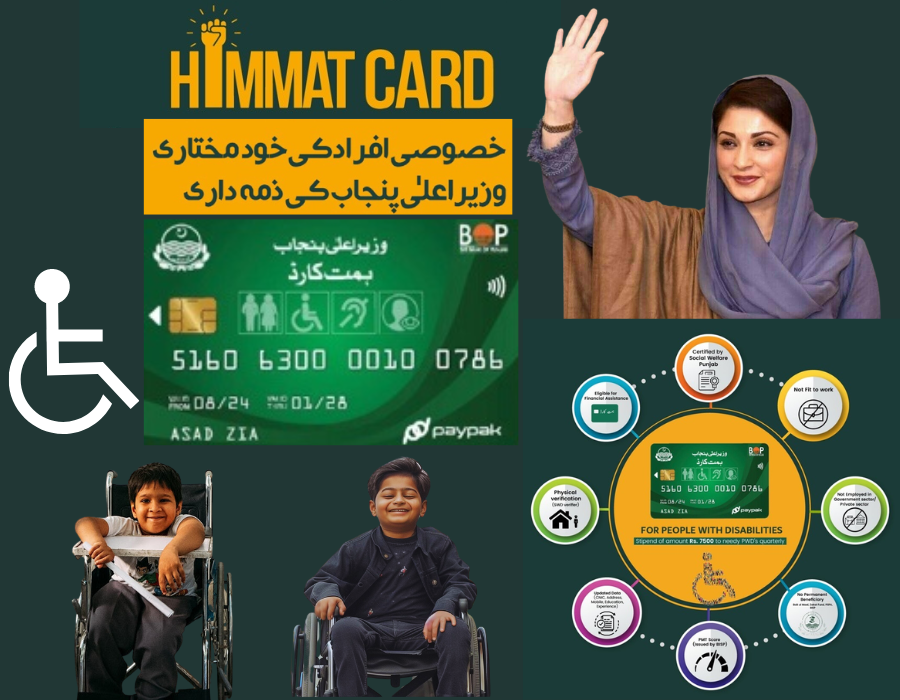
If you need to Himmat Card online apply for a person with disability in Punjab, start on the official DPMIS portal, not on random Android apps. This page covers registration only: who can apply, which documents to prepare, how to submit on DPMIS or at a Social Welfare desk, and what to do while your file is pending. For CNIC status, quarterly payment and Bank of Punjab pickup after approval, use our separate Himmat Card status check guide.
In this guide
Quick answer
- Programme: Himmat Card for eligible persons with disabilities in Punjab (Social Welfare with DPMIS and Bank of Punjab).
- This page: how to Himmat Card online apply, documents, and registration status language.
- Portal: dpmis.punjab.gov.pk/register when new registration is open; home hub at dpmis.punjab.gov.pk.
- Helpline: 1312.
- Stipend (after approval): official material lists Rs 10,500 per quarter; confirm the current cycle on the portal.
- Not on this page: deep status-check walkthrough and payment troubleshooting live on the status check article.
Who can apply
Core eligibility commonly listed in DPMIS / Social Welfare Himmat materials includes all of the following. Exact wording on the live form wins if anything differs.
| Requirement | What it usually means |
|---|---|
| Punjab resident | Applicant lives in Punjab and is covered by the provincial programme |
| Disability proof | Disability certificate / Special CNIC path as required on the form |
| Not fit to work | Assessed as unable or not fit to work because of the disability |
| Not employed | Not in government or private employment that breaks the rule set |
| Other benefits | Not already covered by named conflicting schemes (for example recent BISP / PSPA / Zakat / Bait-ul-Maal support; confirm the live exclusion list) |
| DPMIS data | Basic identity data (CNIC, mobile, and form fields) available in DPMIS |
Related reading: BISP Kafaalat banks list if you need to compare a different federal stipend, and NADRA juvenile / under-18 card guide when a family member still needs identity documents.
Documents checklist
Prepare these before you open the online form so you are not stuck mid-form:
- Valid CNIC of the person with disability (and guardian CNIC if the form asks)
- Disability certificate or Special CNIC details
- Active mobile number for OTP / SMS
- Recent photograph if the upload field is shown
- Any income, PMT, or exclusion declaration the current form lists
Tip: Photograph pages clearly. Blurry uploads are a common reason files stay under process.
Himmat Card online apply steps
Use this sequence when the DPMIS registration window is open:
- Open dpmis.punjab.gov.pk and go to Register / Himmat application (path labels can vary slightly).
- Create an account or log in with the mobile number tied to the applicant.
- Enter CNIC without inventing extra digits. Match the NADRA spelling of the name.
- Fill disability type, assessment, and address fields exactly as on your certificate.
- Upload the documents the form requests, then review every screen.
- Submit and save the application or tracking number shown on screen.
- Later, open Himmat verification on DPMIS to read whether the file is registered, under process, approved, issued, or rejected.
Direct registration entry often used for new accounts: dpmis.punjab.gov.pk/register. Verification after apply: Himmat card verification.
Anyone searching how to apply online should ignore paid “guaranteed approval” messages. The government does not sell queue jumps through WhatsApp agents.
Assisted registration and door visits
If the applicant cannot complete online apply alone, visit the nearest Social Welfare / Bait-ul-Maal facilitation point with original CNIC and disability papers. Staff can help enter the same DPMIS fields. Some drives also include door-to-door verification after you apply. Keep your mobile switched on for SMS about visits or missing documents.
Lahore Metro travel benefits are a different Himmat product story. See Himmat Card for Lahore Metro only if that is what you need, then return here for stipend registration.
After you submit
| What you see | What to do next |
|---|---|
| Submitted / registered | Wait for batch review. Re-check DPMIS weekly. |
| Under process / pending | Do not re-apply in parallel. Fix uploads only if the portal asks. |
| Approved / eligible | Watch for card issuance messaging. Payment detail belongs on the status-check page. |
| Card issued / ready | Collect from the named Bank of Punjab branch with original CNIC. |
| Rejected / not found | Note the reason. Call 1312 or visit Social Welfare about corrections and any re-apply window. |
For balance, quarterly credit timing, and CNIC lookup screenshots after approval, open the Himmat Card CNIC status check article. Keep this URL for registration questions so the two pages do not compete for the same intent.
Mistakes that delay Himmat Card files
Blurry disability certificates, mismatched CNIC spellings, and photos that fail the portal check are the most common delays after you Himmat Card online apply. Upload clear scans. Use the same name order that appears on the CNIC. If a guardian applies for a minor or for a person who cannot complete the form alone, keep guardian CNIC and relationship proof ready for the Social Welfare desk.
Do not pay anyone who promises “same-day Himmat Card online apply approval” on WhatsApp. Registration and later benefit status are separate steps. This page covers registration only. After approval, payment and card pickup rules are explained on our Himmat Card status check guide. Keep your tracking number and CNIC when you call helplines so staff can find the file quickly.
FAQs
How do I Himmat Card online apply in Punjab?
Open the official DPMIS registration page when new applications are open, create or log into your account, enter CNIC and disability details, upload the required documents, and submit. If the portal is closed or hard to use, ask your district Social Welfare office for assisted registration.
Which portal is used for Himmat Card online apply?
Use only dpmis.punjab.gov.pk (registration and Himmat verification paths). Do not pay third-party apps or WhatsApp agents who ask for your CNIC photo.
What documents are needed for Himmat Card online apply?
Keep a valid CNIC, disability certificate or Special CNIC where required, contact mobile number, and any income or exclusion papers the form asks for. Exact upload fields can change on the live form.
What if my Himmat Card online apply status is pending?
Pending or under process usually means your file is in a review batch. Re-check weekly on DPMIS and keep documents ready. For CNIC status and Bank of Punjab payment detail after approval, use the separate status-check guide.
Can I Himmat Card online apply if I already get BISP?
Programme rules exclude people already covered by certain other social assistance schemes. Read the current exclusions on DPMIS before you submit.
Is Himmat Card online apply open right now?
Registration windows open and close by batch. Trust the live DPMIS message on the day you apply. If registration is closed, do not pay anyone who claims they can force an entry.
What is the Himmat Card helpline?
1312 is the number widely published for this programme. Keep your CNIC ready when you call.
Sources
- DPMIS Punjab portal: dpmis.punjab.gov.pk, registration and Himmat verification paths
- Helpline 1312 (as published for the programme)
- Bank of Punjab collection after card issuance (as shown on programme guidance)
This article is an independent explainer for Insight Pakistan readers. It is not a government page. Batch windows change, so trust the live DPMIS screen over any blog, including this one.
